UNROBOTICS — DIGITAL TWIN
Pre-deployment validation and teaching for robots
Plan robot deploymentfrom the drawings you have.
UnRobotics Digital Twin recreates your site in 3D from drawings and documents, and teaches humanoids the work.
INPUT IMAGE
We built this 3D environment and the humanoid’s work from a single image of a typical small machine shop. With drawings or CAD, dimensions come straight from them.
- SCOPE
- humanoid ×1
- TASK
- Tend 2 MCs, carry parts
- CYCLE
- 194 s per cycle
- CHECK
- No collisions
Simulation footage for technical validation. The input is an image representing a typical small machine shop, and the humanoid is a publicly available model.
ASSETS
Drawings, 3D models, documents, photos. Materials of every format and age, brought together in one 3D environment.
REAL WORK
Taught to work on your floor, not to put on a show.
EFFECT
We don’t stop at “it moves.” We simulate whether it pays off.
LINK
Don’t leave everything to one robot. Share the work with the equipment and industrial robots you already have.
ISSUE
You’ve seen the demos. But will it work on your floor?
01
Can’t decide what to hand over
What can it take on, and will it pay off? Without numbers, decisions and approvals stall.
02
Not sure it fits your current equipment
Handoffs, signals, traffic flow, safety distances: you can’t tell until you put it in place.
03
Nowhere to teach it
Procedures and training data can’t be made without a real robot, and you can’t buy one just to experiment.
ASSETS — START FROM WHAT YOU HAVE
Drawings gathering dust are where robot deployment begins.
INPUTyour company’s assets
Drawingsdimensions & layout
DWG/DXF/DGN/JWW/SXF/Paper scans
3D modelsequipment geometry
STEP/IGES/SOLIDWORKS/iCAD SX
Documentsspecs, procedures, signals
Specifications/Work instructions/I/O lists
Imageshow it looks today
Site photos/Videos
3D ENVIRONMENTyour site in 3D
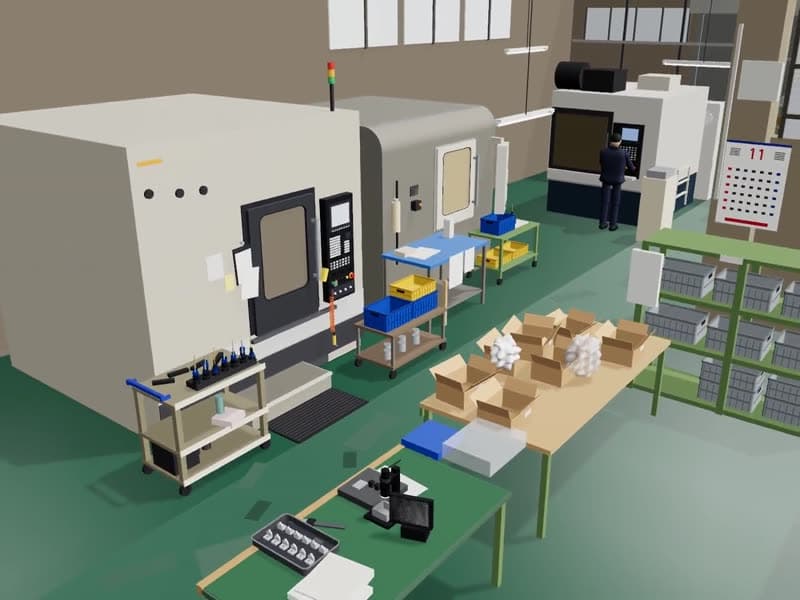
Rebuild it. Run it.
Example: a 3D environment reconstructed from an image of a typical small machine shop
OUTPUTinputs for your decision
- Task suitability assessment
- Layout options & integration simulation
- Equipment list (BOM), estimate & impact
BACK TO CAD
Layouts come back to you in CAD formats such as DXF.
You can start with only a few materials. The video at the top was reconstructed from a single image. Ask us about formats not listed here.
Our reading technology, on its own.
zumen-gate is a service for opening and converting DWG, JWW, SXF, STEP and more in your browser.
SERVICE — TRY · TEACH · GROW
Try, teach, then grow.
It starts with pre-deployment validation. The tasks proven to pay off are the ones we teach to humanoids. UnRobotics helps more companies put humanoids to work on the floor.
01
01TRY
Pre-deployment validation
We recreate your site in 3D from drawings, CAD, documents and photos, then place a humanoid in it and put it to work. We check how work is shared with your existing equipment and robots, traffic flow and takt time, and compare multiple models and layouts by their impact.
OUTPUTTask suitability assessment/3D layout options/Layout drawings (CAD)/Integration simulation/Equipment list (BOM) & estimate/Impact assessment/Teaching plan
ENTRY — Prove the impact before you buy
02
02TEACH
Teaching and training for the first task
We teach the proven task in the same 3D environment, from procedural teaching to training data generation, imitation learning, reinforcement learning and VLA. On real hardware, we validate step by step together with manufacturers and system integrators.
OUTPUTTaught procedures/Trained motions/Training data & evaluation results
CORE — One task you can hand over, up and running
03
03GROW
Adding tasks, re-teaching and scaling
After go-live, we keep using the same environment to add new tasks, re-teach for product or layout changes, evaluate new models, and roll out to a second unit or other sites.
OUTPUTAdded tasks/Updated 3D environment/Rollout plan
ONGOING — More tasks, more units
* The design of safety zones and safety circuits, and the commissioning of real hardware, always require approval from the manufacturer, the system integrator and your safety officer. We work alongside your existing system integrators, online or on site.
Start by telling us what you’d like a humanoid to do.
The first consultation is free. We’ll help you work out whether the task suits a humanoid, whether it can be shared with your current equipment, whether it’s likely to pay off, and what to try first.
DEMO
What we teach, and how we verify it.
These aren’t videos made for show. They are simulations that check whether the work holds up on a real floor.
TECHNICAL DEMO — The following are demos for technical validation. Feasibility, cost and safety requirements are assessed for each project. The humanoid is a publicly available model.
A technical demo in which one humanoid handles picking, washing and transport. The inset at top right is the humanoid’s view. This environment can be used as-is to generate training data and evaluate AI.
The demos are built in our in-house simulation environment. We don’t sell the tool; it’s what we use to teach and verify. More technical demos on @neka_nat.
FAQ
Frequently asked questions
Can humanoids really be used on the shop floor?
It depends on the task. Humanoids that perform at shows and events are a different thing from humanoids that work on the floor every day. Tasks with fixed procedures and little variation in the workpieces, such as handoffs at fixed positions, transport, and loading and unloading machine tools or inspection equipment, are where they work first. Precision assembly and tasks where conditions change a lot take longer to train and validate. Pre-deployment validation is how we find out, in simulation and before you buy a robot, which tasks will work and pay off.
What does pre-deployment validation include?
Based on the materials you have (drawings, 3D models, specifications, photos, videos) and your task conditions, we recreate your site in 3D and place a humanoid in it to work. We look at the task analysis, which tasks to hand over, how work is shared and coordinated with your existing equipment and robots, traffic flow, interference and approximate takt time. We then compare models, peripheral equipment and layouts, and put together an equipment list (BOM), a cost estimate, an impact assessment and a teaching plan.
What materials do I need to get started?
Whatever you have is fine. We combine drawings (DWG, DXF, DGN, JWW, SXF, paper scans, etc.), 3D models (STEP, IGES, SOLIDWORKS, iCAD SX, etc.), documents (specifications, work instructions, I/O lists, etc.) and images (site photos and videos) to recreate your site in 3D. Drawings hold dimensions and layout, 3D models hold equipment geometry, documents hold specifications and signals, and photos show how the site looks today. If materials are limited, or the drawings no longer match the site, we fill the gaps with on-site checks and other means. Ask us about formats not listed here.
Can it work with our existing industrial robots and equipment?
Yes. We include your existing equipment in the model, such as conveyors, machine tools, existing robot arms, AGVs, automatic doors, shelving and inspection equipment. We check whether the division of work between the humanoid and your existing equipment holds up, including handoff positions, signal exchange, timing and the movement of people. If equipment modifications or additional jigs or handoff stations are needed, we also set out what they involve and what they cost.
How do you assess the impact?
From the cycle times obtained in simulation and assumptions about utilization and operating hours, we estimate takt time, labor equivalent, annual impact and payback period. The assumptions are stated explicitly, and multiple configurations are compared under the same assumptions. These are estimates based on the information you provide and the assumptions at the time of review; final costs are confirmed by quotes from manufacturers and system integrators.
How much does it cost?
The first consultation is free. Pre-deployment validation and the teaching and training of the first task are quoted individually, depending on the target task, site surveys, simulation scope, deliverables and support period. After go-live, adding tasks and re-teaching can be contracted on an ongoing basis, monthly or per task. The purchase or lease of the humanoid and peripheral equipment is separate, procured from manufacturers or trading companies.
Can I talk to you before deciding which task to hand over?
Yes. We can start by comparing several candidate tasks on technical difficulty, impact, investment size and operating conditions, and work out which one to try first.
How do you approach humanoid safety?
Safety standards for humanoids are still being developed. We always carry out a risk assessment (ISO 12100) and apply the principles for industrial robots (ISO 10218) and collaborative operation (ISO/TS 15066) to check the distance from people, speed, contact forces and the effects of a fall. The design of safety zones, safety circuits and safety PLCs, and the commissioning of real hardware, always require review and approval by the manufacturer, the system integrator and your safety officer. Safety is never something we handle on our own.
More questions (12)Hide more questions
What exactly does “teaching” involve?
It depends on how difficult the task is. Tasks with fixed procedures are taught by programming the sequence and conditions of the motions. For tasks with variation or change, we generate training data in the same 3D environment used for validation, then train and evaluate with imitation learning, reinforcement learning and VLA (vision-language-action) models. In either case, taught motions are never used on site as-is; we validate them step by step on real hardware together with manufacturers and system integrators.
What tasks and sites do you cover?
We prioritize material handling and transport, loading and unloading machine tools and inspection equipment, picking, palletizing and depalletizing, packing and packaging, and restocking and shelving. Besides factories, we cover logistics warehouses, store back rooms, and transport and restocking inside facilities: anywhere with repetitive work. Tasks that need high precision, such as screw fastening and precision assembly, are assessed case by case after reviewing the technical uncertainty.
Do you work with specific robot models? Are you a distributor for a manufacturer?
We are not a distributor for any manufacturer. We compare multiple models to fit your task and site. Even models that aren’t yet available as hardware can be compared in simulation, based on their published specifications and models.
Can the 3D environment also be used to train AI?
Yes. The 3D environment used for validation becomes the training environment as-is. Generating demonstration data, running imitation learning and reinforcement learning, and evaluating VLA models can all be repeated without real hardware. However, motions learned in simulation are never used on site as-is; they are always validated step by step on real hardware.
Can you help with robots other than humanoids?
Yes. We validate cells with robot arms and AGVs using the same system. We can also look at configurations that combine humanoids with your existing robots, or compare whether a humanoid is the best choice in the first place.
Can I still work with you if I already have a system integrator or manufacturer in mind?
Yes. We work with your existing system integrators and equipment manufacturers, and organize the concept, configuration comparison, validation conditions and requirements from the buyer’s side. If you don’t have a partner yet, we can help identify candidates that fit the project.
What is Physical AI?
Where some AI works with text and images, Physical AI is AI that acts in the physical world through robots and equipment. Humanoids are a prime example: you teach them tasks and they carry them out. What UnRobotics provides is recreating your site in 3D, validating the deployment in simulation down to its impact, teaching the work in that environment, and validating it step by step on real hardware. The 3D models, simulations and motion data built up along the way become assets in their own right.
What exactly do you use AI coding for?
Not as a standalone product, but as a tool for working with on-site data. Its value lies less in building simulations quickly than in increasing the number of configurations we can consider. We build and compare many combinations of models, task splits, handoff methods, layouts and integration methods at once, and choose the most effective configuration. We also use it to create CAD for jigs, control programs for peripheral equipment, equipment lists and specifications. If you wish, we can also set up an AI coding environment on your side and provide training, but adopting a particular tool is never the goal in itself.
Can concepts, programs or learned motions created by AI be used on site as-is?
No, not as-is. AI output is always reviewed by people and validated in simulation and on real hardware. Motions learned in simulation are also checked step by step on real hardware. In particular, safety zones, safety circuits, risk assessments and the commissioning of real hardware always require review and approval by the manufacturer, the system integrator and your safety officer. AI is a tool that speeds up planning and learning; it does not replace accountability.
Do we keep the data you create?
Depending on the scope of the contract, we organize the 3D model of your site, simulations, training environment, generated training data, taught motions, BOM, requirements, programs and operating documents as technical assets you can reuse after deployment. Deliverables and terms of use are defined before we start.
How do you handle project information and drawings?
Where necessary, we receive your videos, photos, drawings and specifications after signing a non-disclosure agreement (NDA), and agree on handling conditions individually, including the AI and cloud environments used. Please don’t send files through the contact form; just tell us an overview first.
What is zumen-gate? How does it relate to robot deployment planning?
zumen-gate (図面ゲート) is a service, developed and operated by UnRobotics, for viewing and converting CAD files. You can open DWG, JWW, SXF, STEP and more in your browser and convert them to other formats. It makes our technology for reading drawings and 3D models available on its own. It is separate from robot deployment planning, and you don’t need zumen-gate to request pre-deployment validation.
CONTACT
Tell us what you’d like a humanoid to do
It’s fine if you don’t know yet whether a humanoid can do it. We’ll review the task and your site and reply within two business days, including whether pre-deployment validation is worthwhile, whether the work can be shared with your current equipment, and whether it’s likely to pay off.
IF AVAILABLE — share what you can
- – The task and the workpieces involved
- – Type of site (factory, warehouse, store, etc.) and surrounding equipment
- – Takt time, production volume, headcount
- – Timeline and budget range
Please don’t attach confidential files such as drawings or videos to this form. If needed, we’ll arrange a secure way to share them after signing an NDA.